ADAS · Driver warnings for fleets

Warn the driver before the crash. Not after it.

iFleet ADAS is a camera behind the windscreen that watches the road ahead and warns your driver, by sound and on screen, when the gap closes too fast, the vehicle drifts out of its lane or someone steps out in front. It fits the vehicles you already own, from a new pickup to a ten-year-old truck.

  • Fits older trucks, buses and vans
  • Installed and calibrated at your yard
  • Warns only: the driver stays in control
REC
  • Forward collision warningGap 0.8 s · 94 km/h
  • AUH 13-40337 · E11Event logged · Driver 07

The four warnings

What ADAS sees, and what your driver hears

REC
  • Forward collision warningClosing fast · 1.1 s
REC
  • Headway warningGap 0.7 s · 38 s long
REC
  • Lane departure warningNo indicator · 87 km/h
REC
  • Pedestrian warningPerson ahead · 22 km/h
  1. 01 · Forward collision

    The truck ahead brakes hard

    ADAS tracks the vehicle in front and works out how quickly you are closing on it. When the time left to react gets too short for your speed, the driver gets a loud alert and a warning on the display, early enough to brake. On the E11 at highway speed, that warning can arrive while the driver still has room to stop.

  2. 02 · Headway

    Following too close, for too long

    Tailgating rarely feels dangerous to the driver doing it. Headway monitoring measures the time gap to the vehicle ahead and warns when it stays too short. It also logs each episode, so you can see which drivers sit on bumpers on the E311 every morning.

  3. 03 · Lane departure

    Drifting without signalling

    Late in a long run, a tired driver can drift over the lane line without noticing. ADAS reads the lane markings and warns when the vehicle crosses one without the indicator on. A cluster of lane warnings in the last hour of a shift is often the first sign of fatigue.

  4. 04 · Pedestrian

    Someone steps out between parked trucks

    In yards, labour-camp roads and industrial areas such as Mussafah or Al Quoz, people cross where they should not. Where the device supports it, ADAS detects a person ahead of the vehicle and warns the driver at low speed.


Driver in control

It warns. It never brakes or steers.

iFleet ADAS is a warning system. It does not touch the brakes, the steering or the engine, so it can be fitted to almost any vehicle without changing how it drives.

The driver hears an audible alert and sees a visual warning in the cab. They decide what to do, as they always have. ADAS simply gives them a second or two more to decide.

  • Sound and visual alert for collision, headway, lane and pedestrian warnings
  • No connection to brakes or steering
  • Every warning recorded with speed, time and location
  • In-cab alertSound + visual alert
  • BrakingDriver decides
  • SteeringDriver decides

One run, Abu Dhabi to Jebel Ali

A delivery truck on the E11, with ADAS on board

An example day for one truck and one driver. Times and values are illustrative.

  1. Fog

    Leaving Mussafah in morning fog

    Visibility is low on the way out of the yard. ADAS warns once when a slow van appears ahead. In thick fog the camera sees less too, so the driver still slows down: ADAS helps, it does not replace caution.

  2. Headway

    Bunching near Ghantoot

    Traffic tightens near the Dubai border. The driver drops to a 0.7 second gap for almost a minute. Headway warnings sound three times and each one is logged.

  3. Collision warning

    Sudden braking ahead

    A car cuts in and brakes. Forward collision warning sounds and the driver brakes in time. With the AI dashcam fitted, a clip from before and after the warning goes to the platform.

  4. Delivery

    Jebel Ali, low-speed yard

    A worker walks out between two trailers. Pedestrian warning sounds at 18 km/h, where supported by the device. The driver stops.

  5. Lane

    Return run, after lunch

    Four lane departure warnings in twenty minutes on the way back. That pattern is a fatigue signal, and the supervisor sees it on the platform.

  6. Review

    Supervisor reviews the day

    Nine events, one driver, one route. The supervisor opens the clip from 06:31, sees a good reaction, and books a short talk about following distance for next morning.

UAE roads

Why ADAS matters on our roads

The conditions UAE fleet drivers face every week, and where a warning helps.

E11 · E311 · E611

Fast lanes, tight gaps

Long, fast highways with mixed traffic: light cars at high speed next to heavy trucks. Not keeping a safe distance is a traffic violation in the UAE, with a fine and black points, and police run campaigns and cameras against it. Headway warnings help drivers keep the gap before it turns into a ticket or a crash.

Fog and dust

Low visibility mornings

Winter fog and summer dust storms can cut visibility on inland roads within minutes. ADAS adds an extra alert when the gap closes, but the camera is limited by what it can see. We tell drivers plainly: in fog, slow down first.

Long runs

Fatigue on the long hauls

Abu Dhabi to Ruwais, Dubai to Fujairah, inter-emirate shuttles: hours of straight road. Repeated lane departure warnings are a useful early sign that a driver needs a break.

Industrial areas

People on foot near vehicles

Yards, warehouses and labour-accommodation roads in Mussafah, ICAD, Jebel Ali and Al Quoz mix trucks with people walking. Pedestrian warning, where supported, gives the driver an extra prompt at low speed.

Mixed fleets

Factory ADAS covers your new cars. What about the rest?

No ADASFactory ADAS (new cars)iFleet ADAS
Works on older trucks, buses and vans——
Same warnings across the whole fleet—Differs by make and model
Warnings logged for the fleet manager—Usually stays in the car
Coaching reports by driver——
Linked to video clips (with AI dashcam)——
Can brake or steer—Often, on newer modelsNo, warns only

Factory systems vary a lot by manufacturer. iFleet ADAS can sit alongside them: on new vehicles many fleets fit it for the reporting alone.

Installation and calibration

How we fit ADAS to your vehicles

Done at your yard or office anywhere in the UAE, usually alongside GPS tracking or a dashcam fit.

  1. 1

    Check each vehicle

    We look at the windscreen, the dashboard and the cab height for each vehicle type. Cracked or heavily tinted glass at the top of the windscreen is fixed or avoided first.

  2. 2

    Mount the camera

    The camera goes high and centred behind the windscreen, out of the driver's view, with wiring hidden behind the trim and connected to vehicle power.

  3. 3

    Calibrate

    We enter the vehicle's width, camera height and position, then calibrate the camera so it judges distances and lane lines correctly for that vehicle.

  4. 4

    Test drive

    A short drive on a real road confirms that each warning triggers as it should and that events appear in the platform against the right vehicle.

  5. 5

    Brief the drivers

    We explain each sound to the drivers in Arabic or English, so the first warning on the road is not a surprise.

In the platform

Every warning becomes a record you can act on

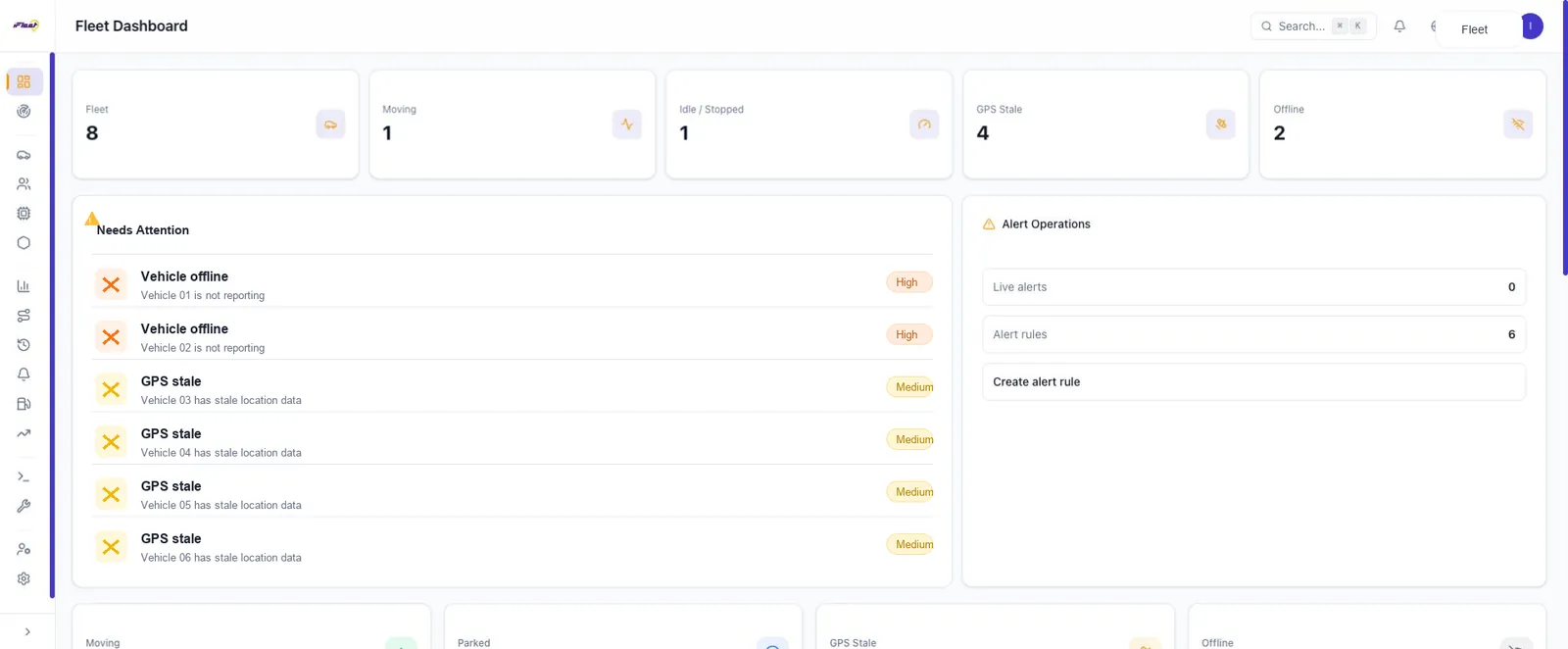
Each ADAS warning is logged in the iFleet platform with the vehicle, the driver, speed, time and location. Filter by warning type, route or shift and see the pattern, not just the single event.

If the vehicle also has the AI dashcam, a warning can save a clip from before and after the moment, so you see exactly what the driver saw.

  • Events by driver, vehicle, route and time of day
  • Supervisors see events as they come in
  • Export for HSE files and driver reviews
app.ifleet.ae
iFleet web platform: fleet dashboard
  • This week · Driver 0714 headway · 3 FCW
  • Lane departures6 · mostly after 14:00

Coaching loop

Warnings change habits when someone reviews them

ADAS gives each driver feedback in real time. The coaching reports give you the weekly picture.

1. Warn in the cab

The driver hears the warning in the moment and corrects straight away.

2. Rank the week

The coaching report shows which drivers get the most warnings, next to the distance they drove, so long-haul and city drivers are compared fairly.

3. Review the moment

Open the event, and the clip if a dashcam is fitted. Talk about what happened, not about a score.

4. Track the trend

Watch each driver's warnings fall over the following weeks, and recognise those who improve.

What is fitted

ADAS kit at a glance

Hardware

Camera
Forward-facing, mounted behind the windscreen
Driver alert
Sound plus visual alert in the cab
Power
12/24 V vehicle power, wired and hidden
Vehicles
Cars, pickups, vans, buses and trucks

Warnings

Forward collision
Yes
Headway (close following)
Yes
Lane departure
Yes
Pedestrian
Where supported by the device

Platform

Event log
Vehicle, driver, speed, time, location
Reports
Coaching reports by driver and fleet
Video
Clips with the AI dashcam
Access
Web platform and mobile app

The exact specification depends on the device chosen for your vehicles. Ask us and we will confirm it for your vehicle types.

Driver acceptance

Introduce ADAS as a co-pilot, not a spy

Drivers accept ADAS faster when they hear about it before it beeps. Tell them it is there to warn them, that it cannot take over the vehicle, and that a warning is not a fine.

Many fleets start with a few weeks where warnings are heard in the cab but not discussed, then begin coaching. We can help you plan that first month and brief your drivers in Arabic and English.

Pricing

Add ADAS, or go Full Safety

Fit ADAS to the vehicles where it matters most, or protect them with tracking, dashcam and ADAS together.

For tracked vehicles

ADAS add-on

Collision, headway, lane and pedestrian warnings added to vehicles on iFleet tracking.

AED quote on WhatsApp

  • Forward collision warning
  • Headway monitoring
  • Lane departure warning
  • Pedestrian warning where supported
  • Event log and coaching reports
Get ADAS price

ADAS questions from UAE fleet managers

Will drivers get false alarms?

Some, especially in the first days and in dense city traffic. Correct calibration for each vehicle removes most of them, and we check the event log after go-live and adjust where the device allows. Tell us if a vehicle beeps too often and we will look at it.

Does ADAS brake or steer the vehicle?

No. iFleet ADAS only warns, by sound and on the in-cab display. It is not connected to the brakes or steering, and the driver stays fully in control.

Which vehicles can it be fitted to?

Cars, pickups, vans, buses and trucks, including older vehicles without any factory safety system. We check the windscreen and cab of each vehicle type before installation.

Why does it need calibration?

To judge distance and lane position correctly, the camera needs to know where it sits and how wide the vehicle is. We calibrate during installation. If the windscreen is replaced or the camera is moved, it needs calibrating again: tell us and we will arrange it.

Does it work with the AI dashcam?

Yes. With both fitted, an ADAS warning can save a video clip from before and after the moment, linked to the vehicle, driver, speed and location. That is what the Full Safety package includes.

How do drivers react to it?

Most accept it once they understand it only warns and cannot take control. A short briefing before go-live helps a lot, and we can give it in Arabic or English.

Does it work in fog or a sandstorm?

It works as long as the camera can see the road and the vehicle ahead. In thick fog or heavy dust it sees less, just like the driver, so warnings may come later or not at all. Drivers should slow down in low visibility whatever is fitted.

Our new vehicles already have factory ADAS. Do we need this?

Factory systems help the driver, but their warnings usually stay inside the car. iFleet ADAS logs every warning for your team, and gives you the same warnings and reports across old and new vehicles.

Works best together

Start with the vehicles that worry you most

Tell us your vehicle types and routes. We will recommend where ADAS helps, and send an AED quote on WhatsApp.

Chat about ADAS on WhatsApp